
How to Create a Relaxing Home Workspace
Working from home can be more enjoyable when your workspace feels calm, comfortable, and inviting. A relaxing workspace does not need expensive furniture or a large room. With a few thoughtful changes, you can create an area that supports focus while helping you feel at ease throughout the day.
Choose the Right Location
The best workspace location depends on your home, schedule, and daily habits. If possible, choose an area with natural light and enough room for your desk, chair, and essential supplies.
A quiet corner is often ideal, but it is not the only option. A small section of a bedroom, living room, hallway, or dining area can work well when arranged carefully. Try to select a location that is separate from high-traffic areas and household distractions.
Before setting up your desk, consider:
– How much noise the area receives
– Whether you have access to power outlets
– The amount of natural light
– How easily you can keep the space tidy
– Whether the location feels comfortable for long periods
If you share your home with others, let them know when you need quiet time. A simple routine or visual signal can make it easier to protect your work hours.
Select Comfortable, Practical Furniture
Comfort is one of the most important parts of a relaxing workspace. A desk and chair should support your daily activities without making the room feel crowded.
Choose a desk that provides enough space for your computer, notebook, water bottle, and other essentials. If your room is small, consider a compact desk, wall-mounted surface, or foldable table. Keep the design simple so the workspace does not feel overwhelming.
Your chair should allow you to sit comfortably with your feet resting on the floor. Your shoulders should feel relaxed, and your screen should be positioned so you do not need to bend your neck for long periods. A small cushion or footrest can add extra comfort if needed.
You can also add a few practical items:
– A monitor stand to create more desk space
– A soft desk mat for a warmer feel
– A footrest for added comfort
– A small side table for books or supplies
– A cable box or clips to manage wires
The goal is to create a setup that feels supportive without filling every available surface.
Use Lighting to Set a Calm Mood
Lighting can change the entire atmosphere of a room. Natural light is a welcome choice during the day, so place your desk near a window if possible. Avoid positioning the screen directly in front of or behind the window, as this can create glare.
For cloudy days or evening work, use a desk lamp with a soft, comfortable glow. A lamp with an adjustable angle allows you to direct light where you need it. You may also enjoy adding a floor lamp, wall light, or small decorative lamp to create softer background lighting.
Try to avoid relying only on bright overhead lights. Layered lighting often makes a workspace feel warmer and more relaxing. Keep your lighting flexible so you can make the room brighter for detailed tasks and softer when reading or winding down.
Keep the Color Palette Simple
Color has a strong effect on how a space feels. Soft neutrals, gentle greens, light blues, warm whites, and muted earth tones can help create a peaceful atmosphere. You do not need to repaint the entire room. Small details such as a desk mat, cushion, artwork, or storage boxes can introduce calming colors.
If you prefer brighter shades, use them in small amounts. A colorful notebook, plant pot, or piece of artwork can add personality without making the space feel busy.
Choose colors that you enjoy seeing every day. A relaxing workspace should reflect your preferences rather than follow a strict design rule.
Add Natural Elements
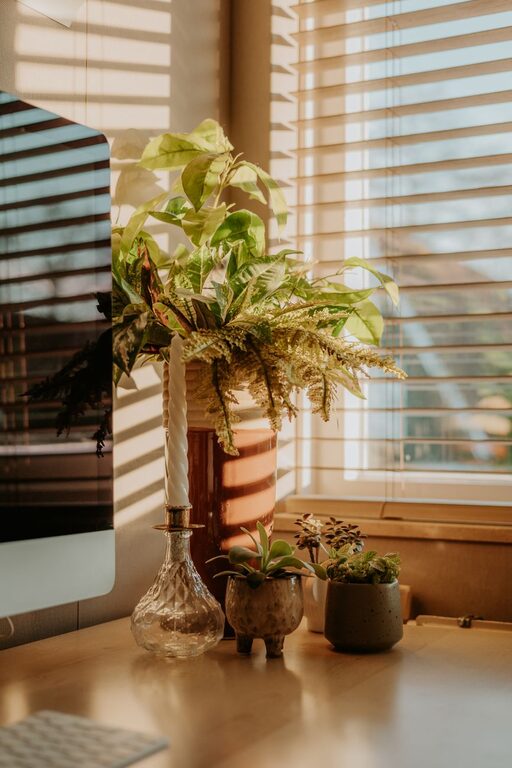
Natural materials and plants can make a workspace feel more welcoming. A small houseplant, vase of flowers, wooden tray, or woven basket can add texture and warmth.
If you do not have much natural light or time for plant care, choose a low-maintenance plant or use dried flowers. Even a small bowl of stones or a nature-inspired print can bring a natural feeling to the area.
Keep decorations limited to items that make you feel good or serve a useful purpose. Too many objects can make cleaning and organizing more difficult.
Organize Without Making the Space Feel Sterile
A tidy workspace is easier to use, but perfect organization is not necessary. Start by keeping only the items you use regularly on the desk. Store less frequently used supplies in drawers, boxes, or nearby cabinets.
Create a simple home for each essential item. For example, notebooks can go in one tray, writing tools in one container, and charging cables in a small box. This makes it easier to reset the room at the end of the day.
Helpful organization ideas include:
– Use a tray to group small daily items
– Label storage boxes when helpful
– Keep a wastebasket within easy reach
– Store paperwork vertically to save space
– Use a drawer organizer for small supplies
– Leave one clear area on the desk
At the end of each work session, spend a few minutes returning items to their places. This small habit can make the next workday feel more pleasant.
Reduce Visual and Digital Clutter
A relaxing workspace should support your attention rather than compete for it. Remove unused items from the desk and keep decorative pieces intentional. If open shelves look crowded, use matching baskets or boxes to create a cleaner appearance.
Digital clutter can affect your sense of calm, too. Organize computer files into clearly named folders and remove shortcuts or notifications you do not need. A simple desktop background and a limited number of open tabs can make your screen feel less distracting.
Consider keeping your phone outside the immediate workspace when you need focused time. If that is not practical, place it face down or use a quiet setting.
Add Personal Comfort
Small personal touches can make your workspace feel more like your own. Consider adding a favorite mug, a framed photo, a soft throw, or a piece of artwork. These details can make the space feel warm without affecting its function.
You might also keep a few comfort items nearby, such as:
– A water bottle
– A light sweater
– Hand lotion
– A small snack
– A notebook for quick thoughts
– Headphones for quiet background sound
Choose items that support your routine. The purpose is to make your work area pleasant, not to create another collection of things to manage.
Create a Simple Start and End Routine
A workspace feels more relaxing when it has clear boundaries. At the beginning of the day, open the blinds, turn on your lamp, and prepare the items you need. This creates a consistent signal that it is time to begin.
When your work is finished, close your computer, clear the main surface, and adjust the lighting. If your workspace is in a shared room, put away items that make the area feel like an office. This small transition can help separate work time from personal time.
You can also end the day by writing down the next task you plan to complete. This gives you a clear starting point for the following day and reduces the need to remember unfinished details.
Keep Improving the Space
Your ideal workspace may change as your needs change. After using the area for a week, notice what feels comfortable and what creates frustration. You may need to move the lamp, adjust the chair, reduce decorations, or add more storage.
Make changes gradually instead of trying to redesign everything at once. A relaxing workspace is built through small improvements that make daily life easier.
The most important elements are comfort, order, pleasant lighting, and a setup that suits your routine. Whether you have a full home office or a small corner, a thoughtful arrangement can help you feel calmer, more focused, and ready to get started.
